Sprites and 2D
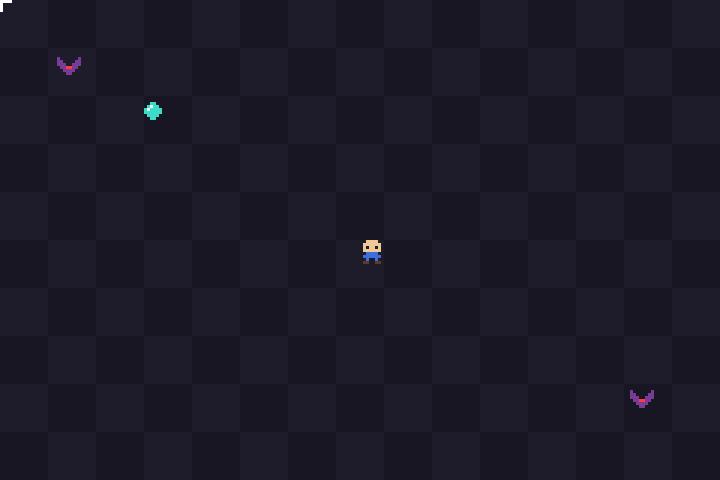
examples/sprite-demo/sprite.HC is a complete small game: a player, collectibles, enemies, collision, a hit flash, a score, and mouse input. It's about 300 lines. This page walks through the techniques it uses.
Sprites as text
Instead of loading image files, the sprites are written directly in the source as character grids:
U8 *g_gem_rows[SPRITE_SIZE] = {
  "........",
  "...cc...",
  "..cwcc..",
  ".cwcccc.",
  ".cccccc.",
  "..cccc..",
  "...cc...",
  "........",
};
Each character maps to a color, and . is transparent:
U32 PaletteColor(U8 ch)
{
  switch (ch) {
    case 'c': return Rgb(60, 220, 200);
    case 'w': return Rgb(230, 255, 255);
    // ...
  }
  return Rgb(255, 0, 255);   // magenta: a character with no color assigned
}
Drawing a sprite loops over the grid and skips the dots. That's all a sprite blitter is:
for (I64 row = 0; row < SPRITE_SIZE; row++) {
  U8 *line = s->rows[row];
  for (I64 col = 0; col < SPRITE_SIZE; col++) {
    U8 ch = line[col];
    if (ch == '.')
      continue;
    CanvasPixel(c, x + col, y + row, PaletteColor(ch));
  }
}
The approach keeps the program to a single file, makes the art easy to diff in git, and means there's no image loader to write. For larger art, see Loading real images.
Animation
The bat has two frames, wings up and wings down, and switches every 120 ms:
More frames work the same way: an array of sprites indexed by (clock / frame_ms) % frame_count.
Flashing
After a hit, the player flashes white for a second. DrawSprite takes an optional tint that replaces every opaque pixel's color:
U32 tint = 0;
if (g->hurt_ms > 0 && (g->hurt_ms / 80) % 2)
  tint = Rgb(255, 255, 255);
DrawSprite(c, &g_hero, x, y, tint);
Movement with fixed-point numbers
Positions are stored as integers scaled by 256, so x = 2560 means pixel 10. To draw, divide by 256.
#define FP 256
h->x += dx * PLAYER_SPEED * ms;   // PLAYER_SPEED is in 1/256 px per ms
DrawSprite(c, &g_hero, h->x / FP, h->y / FP);
This gives smooth sub-pixel movement without floating point. It's a classic technique for 2D games, and with hcc there's a second reason to use it: integer comparisons don't run into the float comparison bugs.
Collision
Each actor is treated as an 8x8 box, shrunk slightly so near-misses don't count. Two boxes overlap unless one is completely to the left, right, top or bottom of the other:
Bool Overlaps(Actor *a, Actor *b)
{
  I64 ax = a->x / FP, ay = a->y / FP;
  I64 bx = b->x / FP, by = b->y / FP;
  if (ax + SPRITE_SIZE - 2 <= bx + 1 || bx + SPRITE_SIZE - 2 <= ax + 1)
    return FALSE;
  if (ay + SPRITE_SIZE - 2 <= by + 1 || by + SPRITE_SIZE - 2 <= ay + 1)
    return FALSE;
  return TRUE;
}
Fixed pools instead of allocation
Bats live in a fixed array with an alive flag:
Spawning finds the first dead slot, and nothing is ever freed. For games with a known upper bound on objects, this avoids per-frame MAlloc/Free and the leaks and crashes that come with them.
Random numbers
hcc's runtime library has no random-number functions, so the demo uses a three-line linear congruential generator seeded from SDL_GetTicks(). (You could declare libc's rand with extern "c" instead.) Owning the generator also makes runs reproducible: seed it with a constant and the same bats appear in the same places, which helps when debugging.
Bitmap font text
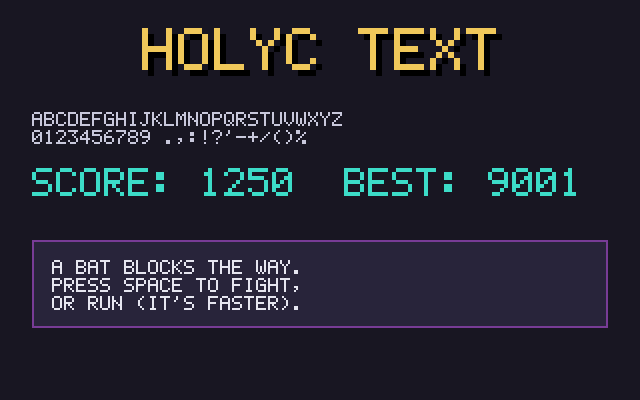
The window title works for a score, but anything inside the game needs text drawn into the canvas. examples/common/font.HC is a 5x7 font stored the same way as the sprites. Fitting 48 glyphs one per array would take 48 arrays, so they're packed eight to a band, with a blank column between each:
U8 *g_font_chars = "ABCDEFGHIJKLMNOPQRSTUVWXYZ0123456789.,:!?'-+/()%";

U8 *g_font_rows[] = {
  // A     B     C     D     E     F     G     H
  ".###. ####. .###. ####. ##### ##### .###. #...#",
  "#...# #...# #...# #...# #.... #.... #...# #...#",
  // ...five more rows, then the next band
};
A character's position in g_font_chars says where its art is: band i / 8, starting column (i % 8) * 6. Drawing a glyph is the sprite loop with one color, and each lit cell is a scale x scale square, so the same font works for small labels and big titles:
for (I64 row = 0; row < FONT_H; row++) {
  U8 *line = g_font_rows[first_row + row];
  for (I64 col = 0; col < FONT_W; col++)
    if (line[first_col + col] == '#')
      CanvasFillRect(c, x + col * scale, y + row * scale, scale, scale, color);
}
FontDrawText walks the string, moving the pen 6 pixels per character and down 9 on '\n'. Lowercase is drawn as uppercase, and characters missing from the font leave a gap. To add one, append it to g_font_chars and its art to g_font_rows. The last band is full, so a new glyph starts a new band of seven rows.
Numbers go through StrPrint first:
U8 score[64];
StrPrint(score, "Score: %d", g->score);
FontDrawText(c, 4, 4, score, Rgb(60, 220, 200));
FontTextWidth returns the pixel width of the longest line, which is what centering needs. A drop shadow is the same text drawn one step down and right in black, before the real color:
I64 x = (c->width - FontTextWidth(text, scale)) / 2;
FontDrawText(c, x + scale, y + scale, text, Rgb(0, 0, 0), scale);
FontDrawText(c, x, y, text, color, scale);
Tilemaps and scrolling
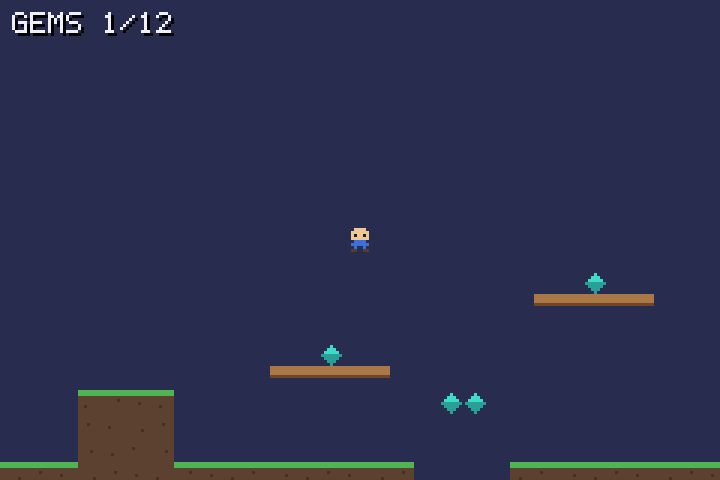
examples/tilemap/tilemap.HC is a platformer level 100 tiles wide, with a camera that follows the player. The level is another string grid, one character per 8x8 tile:
// '#' ground, '=' platform, '*' gem, '@' where the player starts.
U8 *g_level_rows[MAP_H] = {
  // ...
  "..............####...........**..................................####...",
  "...@..........####...............................................####...",
  "############################....#######################.....############",
};
String literals are read-only, so LoadLevel copies the grid into a U8 map[MAP_W * MAP_H] inside the game. That copy is what the game reads and changes: collecting a gem overwrites its '*' with '.'.
Collision against tiles
The player is a 6x8 box. Since it's no bigger than a tile, checking its four corners against the map is enough to tell whether it overlaps anything solid.
Movement happens one axis at a time. Move along x, and if the box now overlaps a solid tile, push it back to that tile's edge and stop horizontal movement. Then do the same along y:
p->y += p->vy * ms / 1000;
I64 px = p->x / FP, py = p->y / FP;
if (!BoxSolid(g, px, py, PLAYER_W, PLAYER_H))
  return;
if (p->vy > 0)
  py = (py + PLAYER_H - 1) / TILE * TILE - PLAYER_H;   // landed on a floor
else
  py = (py / TILE + 1) * TILE;                         // hit a ceiling
p->y = py * FP;
p->vy = 0;
Resolving each axis separately is what lets the player slide along a wall while falling, instead of sticking to it. Whether the player is standing is a separate question: after moving, check the box one pixel lower. If that's solid, a jump is allowed.
Two details keep this correct:
- Small steps. A slow frame could move the player more than a tile at once and carry them through a floor.
Updatesplits each frame into steps of at most 10 ms. At top falling speed that's 3 pixels per step. - Negative coordinates. Integer division rounds toward zero, so pixel
-3divided by 8 is tile 0, not tile -1. The player's x is clamped at 0 instead of relying on a tile column left of the map.
The camera
The camera is the level-space position of the screen's top-left corner. It centres on the player, then clamps so it never shows past the level's edges:
Everything is drawn at its level position minus the camera. Only the tiles the screen can show are drawn: from cam_x / TILE across WIDTH / TILE + 1 tiles, where the extra one covers a tile cut off at the edge.
Input as data
Update takes an Input (a direction and a jump flag) instead of reading the keyboard itself. The window loop fills it from SDL. --ppm mode fills it with "hold right and jump" for two seconds, then saves the frame. That's a full game update tested without a window, the approach Project layout recommends.
Loading real images
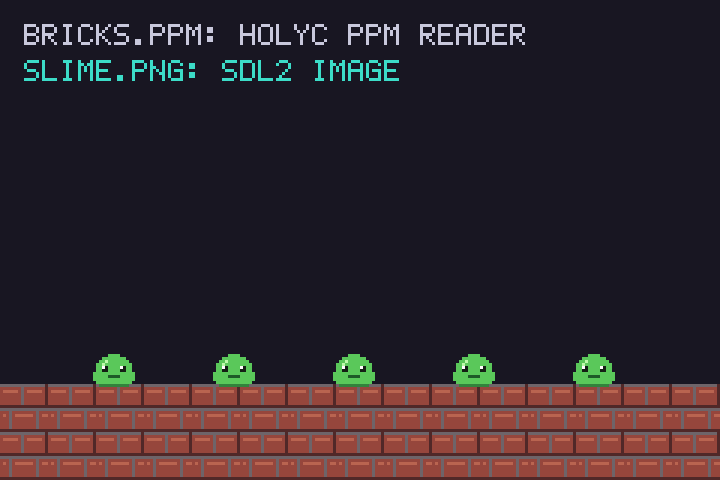
hcc has no image decoder, but there are two short routes into a canvas. examples/image-load/load.HC uses both: the bricks are a PPM read by HolyC, and the slime is a PNG read by SDL2_image.
PPM, in HolyC
A binary PPM is a short text header, P6, then width, height and the maximum channel value, followed by raw RGB bytes. CanvasLoadPpm in canvas.HC reads the header with FileRead and a small number parser that skips # comments, then converts each RGB triple with Rgb:
It only accepts 8-bit binary PPMs (P6 with a maximum of 255). That's what CanvasSavePpm writes, and ImageMagick writes it when asked for 8 bits per channel, so any image can be converted ahead of time:
Leave out -depth 8 and ImageMagick picks the smallest maximum that fits the image: 65535 for a 16-bit PNG, but 3 for an image with only four shades of grey. The reader rejects both.
PPM has no alpha channel, so every pixel comes in opaque. It needs no library at all.
PNG and JPEG, through SDL2_image
examples/common/sdl2_image.HC binds IMG_Load, which returns an SDL_Surface. A surface can come back in any pixel format, so CanvasLoadImage asks SDL to convert it to SDL_PIXELFORMAT_ARGB8888 first. That's the canvas's own layout, alpha included. Then it copies the pixels row by row, since a surface's rows can be padded beyond w * 4 bytes and pitch says by how much:
U8 *row = argb->pixels;
for (I64 y = 0; y < argb->h; y++) {
  MemCpy(c->pixels + y * c->width, row, argb->w * sizeof(U32));
  row += argb->pitch;
}
SdlSurface in sdl2.HC declares only the first fields of C's SDL_Surface, the ones a program reads. That's safe because HolyC never allocates one; it only reads through pointers SDL returns.
The binding lives in its own file with its own #link <SDL2_image>, so programs that don't include it don't link the library.
Drawing with transparency
CanvasBlit copies one canvas onto another and skips pixels whose alpha is below half. A PNG with a transparent background draws as a sprite; a PPM, being fully opaque, draws as a solid rectangle. Canvas drawing functions always write full alpha, so a canvas you've drawn on blits the same way.
Asset paths like "bricks.ppm" resolve against the working directory, which is why the example is run from its folder. For a real game, see Assets.
The other option is to skip files and generate the art in code. Ossuary, a HolyC game this guide grew out of, generates all its textures procedurally.