3D overview
HolyC has no 3D engine, and neither does hcc. What you get is a language that can do the maths and call a graphics API. This page explains how far that takes you and what a realistic stack looks like.
The pipeline, by hand
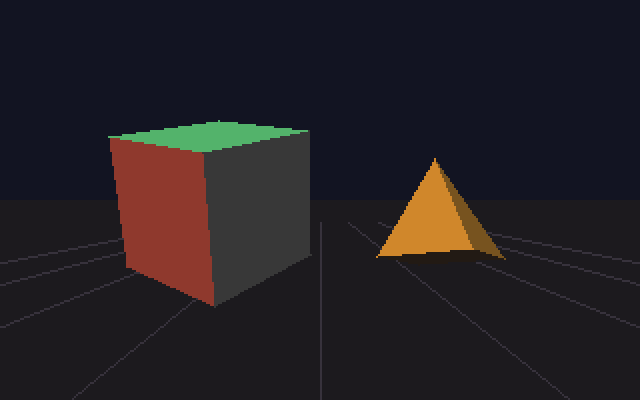
examples/simple-3d/cube.HC renders 3D entirely in HolyC on the CPU. It's meant for learning: every stage that a GPU normally hides is a function you can read.
flowchart LR
    A["model vertices"] -->|"rotate, scale, move"| B["world space"]
    B -->|"cull back faces,<br/>light each face"| C["visible faces"]
    C -->|"x/z, y/z"| D["screen points"]
    D -->|"sort far to near"| E["painter's order"]
E -->|"fill triangles"| F["canvas"]- Transform. Each vertex is rotated (yaw, then pitch), scaled and translated into place. The camera sits at the origin looking down +z.
- Cull. The cross product of two triangle edges gives the face normal. If the normal points away from the camera, the face is on the back of the object and is skipped.
- Light. Brightness is the dot product of the normal and a light direction, plus some ambient light so shadowed faces aren't black.
- Project. Perspective is a division:
screen_x = centre + x * focal / z. Things further away get smaller. - Sort and fill. There's no depth buffer. Faces are sorted far-to-near and drawn in that order, so nearer faces paint over further ones (the painter's algorithm).
Press Space in the demo to see the wireframe.
Limits of this approach
The painter's algorithm breaks when faces intersect or overlap cyclically. There's no near-plane clipping: triangles crossing the camera plane are dropped whole. The renderer is also flat-shaded and untextured. Fixing all of that means writing a real rasterizer with a depth buffer and clipping, which is a good exercise but slow on a CPU at modern resolutions.
The practical approach: HolyC drives the GPU
For an actual 3D game, the work divides like this:
| Layer | Language | Does |
|---|---|---|
| Game logic | HolyC | state, rules, AI, collision, input handling |
| Maths | HolyC | vectors, matrices, camera, culling |
| Mesh building | HolyC | fills vertex arrays, uploads them once with glBufferData |
| Platform | SDL2, called from HolyC | window, GL context, input, timing |
| Drawing | OpenGL, called from HolyC | buffers, textures, draw calls |
| Shading | GLSL | per-vertex and per-pixel work on the GPU |
examples/opengl-demo/opengl_example.HC is the smallest version of this: about 270 lines that open a GL 3.3 core context, upload a cube, build a model-view-projection matrix each frame and draw it with depth testing.
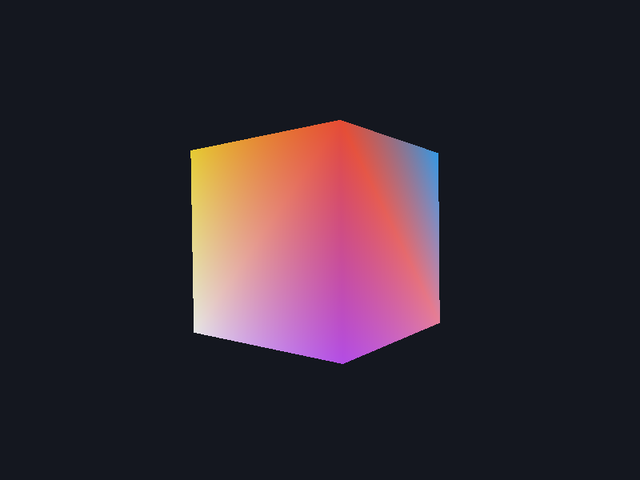
What changes compared with the software renderer:
- Matrices replace the hand-written transform. The same rotate, translate and project steps become 4x4 matrices multiplied together on the CPU and sent as one uniform.
- The GPU does culling, depth and filling.
glEnable(GL_DEPTH_TEST)replaces the face sorting entirely. - Data is uploaded once. Vertices go into a buffer at start-up. Each frame only sends the matrix.
- Matrices go to OpenGL as
F32. Keep the maths inF64and convert when copying into anF32[16].
What a realistic HolyC 3D game looks like
Ossuary is a first-person horror prototype built this way. Its structure is a good template:
src/
  runtime/
    platform/   window.HC, sdl_gl.HC     SDL declarations and a thin window wrapper
    opengl/     bindings.HC              GL declarations
  game/
    core/       math, memory arena, clock
    render/     shaders, procedural textures, meshes, camera, renderer
    world/      level grid, player, enemy AI, collision
    systems/    input mapping, state machine, game loop
  assets/shaders/*.vert, *.frag         the only non-HolyC code
Things it needed that this guide doesn't cover in depth: a memory arena for per-level allocations, a flow-field pathfinder, a batched UI renderer, and a bitmap font. They're all ordinary HolyC.
Things that will catch you
- Classes by value. Under
hcc -jit, a function that takes and returns a small integer class by value gives wrong results. Writing maths asV3Add(Vec3 *out, Vec3 *a, Vec3 *b)avoids it everywhere. See Compiler quirks. - Negating array elements.
-v[0] * s + v[2] * cmiscompiles. This bug was found while writing the cube example. See Compiler quirks. - Column-major order. OpenGL expects matrix element
[col * 4 + row]. If your scene comes out mirrored or sheared, check the order first. - macOS needs core profile. Request 3.3 core with the forward-compatible flag, or macOS gives you OpenGL 2.1.